


-

Hide and Luig
-

Meccha Hunt
-
Fruit Ninja
-

Toaster Dash
-
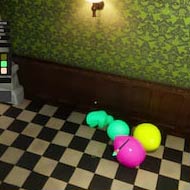
Meccha Chameleon 3
-
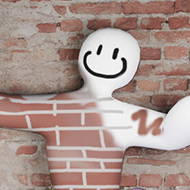
Meccha Chameleon 2
-

Water Color Sort
-
Stickman Chameleon
-
Paint to Hide!
-
Paint&Seek Online
-
Meccha Obby
-
Paint or Seek: Chameleon Hide Online
-
Hide ‘N Seek!
-

Paint Strike
-
Meccha Chameleon Mobile
-
A Little to the Left
-

Among Us
-

Stickman Hook
Painting Guide: How to Blend In Fast
In Meccha Chameleon, your brush matters as much as your hiding spot. The game’s own description puts “artistic skill” next to the spot and the pose as the keys to survival, and anyone who has watched a round’s reveal knows why. A mediocre corner with a clever paint job can survive the whole round, while a perfect corner with a flat, careless coat gets shot in seconds. This guide explains how painting works and how to get convincing results within the short hiding phase, even if you have never drawn anything in your life.
How Painting Works
Every Hider starts as a completely white figure. During the hiding phase you open paint mode, rotate your character and brush colour directly onto its body. You have three core tools:
- Colour picker for choosing any shade manually.
- Eyedropper for copying a colour straight from the scenery around you.
- Brush sizes for switching between wide coverage and fine detail.
You can paint with a mouse, a controller or, since update 4.1.1, the touch screen. The goal is not to create a beautiful picture. The goal is to make a Hunter’s eyes slide past you without stopping.
Step 1: Choose the Background Before You Paint
Painting starts before you open paint mode. Stand where you plan to hide and look at your background from the direction Hunters will come from. The best backgrounds for beginners have one or two dominant colours and simple shapes: a plain wall, a large floor area, a wooden panel, a shelf of similar items. Complex patterns look like good cover, but they take far longer to copy.
Remember that the Hunter’s view matters, not yours. If Hunters will enter from a doorway, the side of your body facing that doorway is the one you need to paint first.
Step 2: Lay Down the Base Colour
Use the eyedropper on the main colour of the surface behind you and cover the visible side of your body with a large brush. Do this quickly. A full base coat already removes the biggest giveaway: bright white. Many rounds are lost because a Hider spent the whole phase on details and left half their body untouched.
Good rule of thumb: finish the base colour in the first third of the hiding phase.
Step 3: Copy the Lighting
This is the step that separates good painters from average ones. Surfaces in the game are rarely one flat colour. A wall is brighter near a lamp and darker near the floor; a shelf has shadows under each board; a corner is darker than the middle of a wall. If your body is a single flat colour, it will look like a sticker even when the colour is perfect.
- Sample the lighter and darker parts of the surface separately with the eyedropper.
- Paint the gradient in the same direction as the scenery: lighter towards light sources, darker towards the floor or into corners.
- Add a slightly darker band where your body meets the wall or floor to hide the outline.
Step 4: Add Lines and Key Details
Hunters recognise patterns. Tile grout, wooden planks, window frames, picture edges and shelf boards all create lines, and your body should continue those lines. Two or three well-placed dark strokes that line up with the scenery often do more than a minute of careful shading. Switch to a small brush and trace the most visible lines that cross your silhouette.
Do not try to copy everything. Pick the details a Hunter would notice from a few metres away and ignore the rest.
Step 5: Lock In the Pose
Leave time at the end of the phase to choose a pose. The same paint job looks completely different standing up, curled into a ball or lying flat. Choose the shape that matches your spot, then check your paint once more from the Hunters’ likely angle.
Painting Strategies by Surface
| Surface | What to focus on | Common mistake |
|---|---|---|
| Plain wall | Soft light gradient, dark edge where you touch the wall | One flat colour that looks like a cut-out |
| Wooden floor or panel | Plank lines running in the right direction | Lines drawn at the wrong angle |
| Tiles | A few grout lines that continue the grid | Trying to paint every tile |
| Bookshelf or shelf | Blocks of colour that match the items’ height | Painting random stripes of every colour |
| Dark areas | Deep, even shadow tones | Using colours that are too bright |
| Bright candy or neon colours | Bold, confident blocks of colour | Muddy mixes between two shades |
Painting Faster
- Sample, do not guess. The eyedropper is faster and more accurate than any colour chosen by eye.
- Big brush first, small brush last. Never start with details.
- Paint one side properly. The side facing the room matters most; the back can stay rough.
- Practise on one map. Learning the palette of a map you play often makes you much faster there.
- Watch the reveal. Every reveal shows you which paint jobs survived and why.
Painting With a Controller or Touch Screen
Controller painting used to feel clumsy, but updates 4.1.0 and 4.1.1 fixed the most annoying problems, including framerate-dependent brush speed, an upward drift and the cursor jumping after brush size changes. There is also a setting for painting movement speed on controller. Lower it for details and use slow, straight strokes. On Switch 2, the touch screen is the fastest way to trace fine lines once the base coat is on.
Common Painting Mistakes
- Leaving white patches. Even a small white spot on the side facing the room is enough to get you noticed.
- Painting the wrong side. Check which direction Hunters will come from before you start.
- Ignoring the edges. Your outline is what Hunters see first; blend it with a darker tone.
- Running out of time. A finished simple paint job beats an unfinished masterpiece.
- Repainting after the hunt starts. Once Hunters are on the map, stillness matters more than perfection.
Keep reading: How to Play: Beginner’s Guide and Controls and Best Settings.